How do I change the WiFi connection on my softener?
19 August 2021
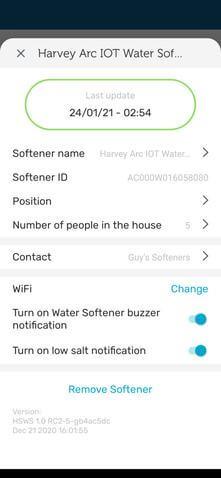
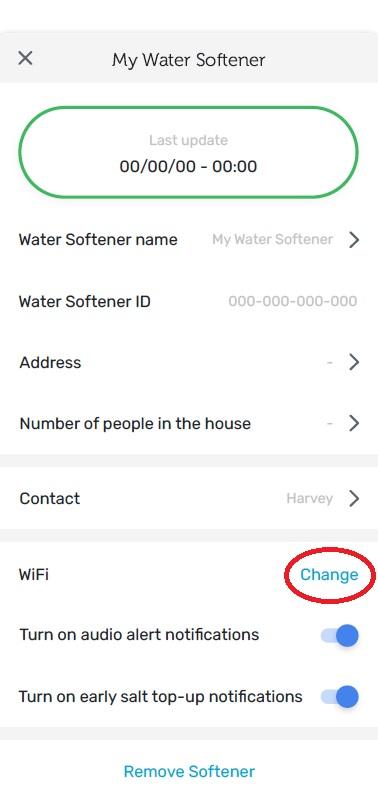
Step 1: Go to settings on your myHarvey app, then scroll to WiFi and select ‘Change’.
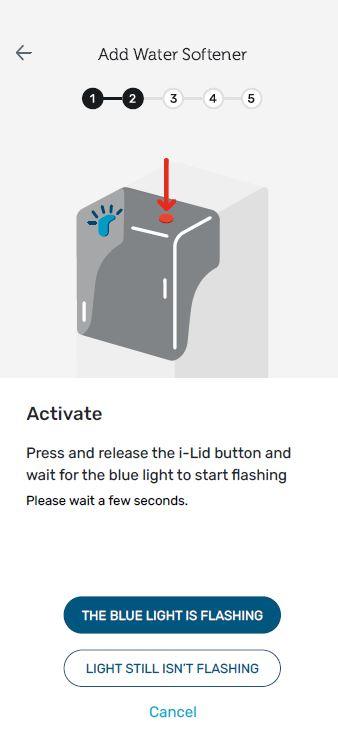
Step 2: Follow the on-screen instructions. You will be asked to input your new WiFi username and password into the myHarvey app during this process.
Step 3: Your WiFi network will then be updated in the myHarvey app.
ArcCare
Will my subscription amount change?
We have the right to increase the subscription price each year, any price increase will be applied on the annual anniver...
ArcCare
Can I select a specific date for the direct debit to be taken
Yes – you can do this when you set up your plan. First payment will be taken 15 days to 6 weeks after your installatio...
ArcCare
What date will my direct debit be taken?
On the date set out in your order confirmation email and subsequently each month on the same date....